Eclipse Menu
EclipseOS 1.3.0 ready · 185 Eclipse mods loaded
Mods from another orbit.
A brand-new mod menu for Gorilla Tag.
Eclipse floats on your hand as its own glowing 3D panel, with 4 layouts, 18 space themes and 185 space mods of its own. It’s remade from Nova Menu, so the classic mods are all there too.
- 185 Eclipse mods
- 7 categories
- 18 themes
- 21 achievements
- 4 layouts
Free and open source under the GPL-3.0 license. Nothing to buy, ever. Source on GitHub (opens in a new tab)
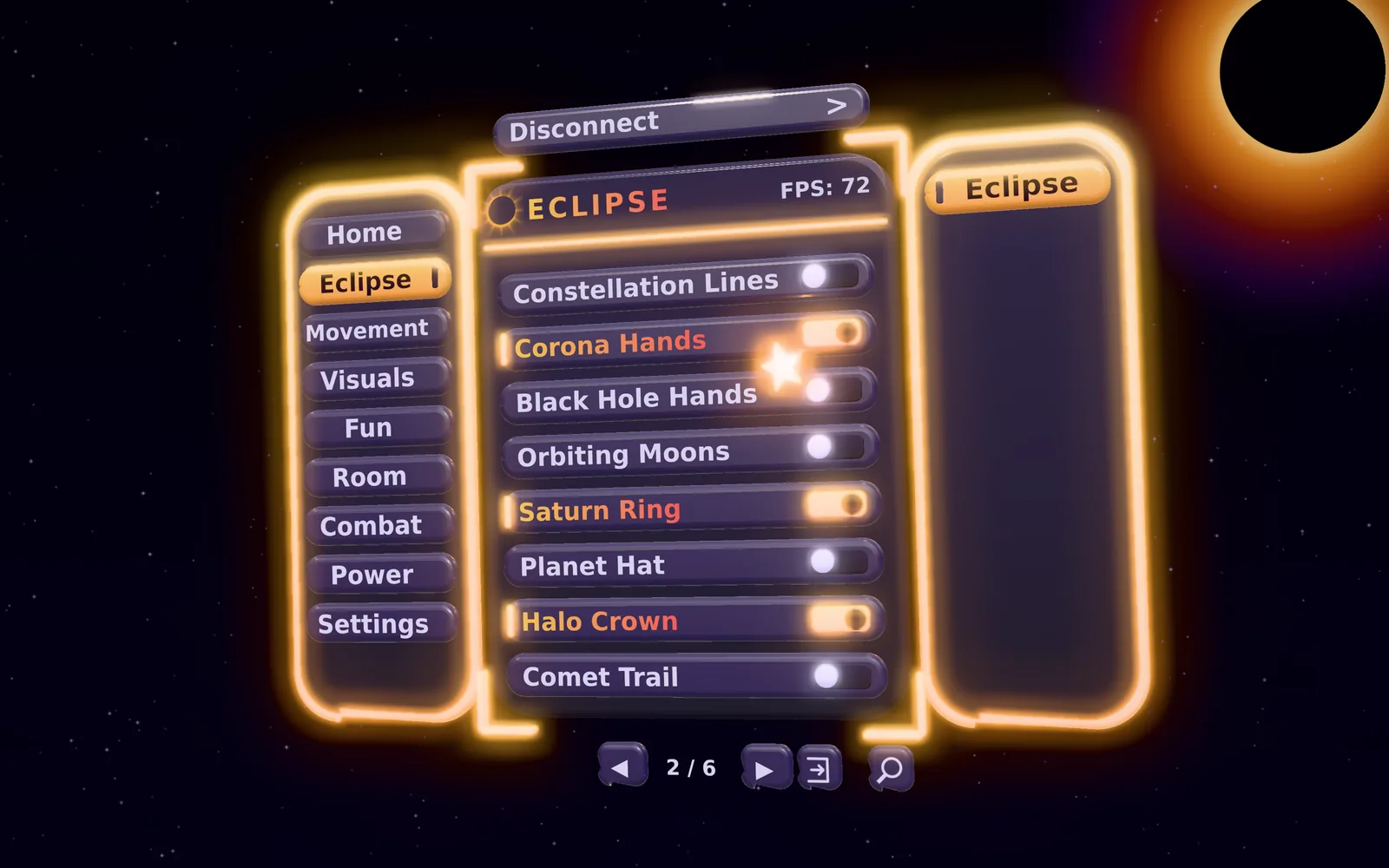
A preview in your browser — in the game it’s a 3D panel on your hand.
INFO Pick a tab, then switch some mods on.
All 185 Eclipse mods
Eclipse Sky
 Eclipse Mods
A total eclipse hangs in your sky: a dark moon ringed by a burning corona. Only you can see it.
✓ in the Legal versionStar Field
Eclipse ModsTwinkling stars all around you, whatever map you are on. Only you can see them.
✓ in the Legal versionStarfall
Eclipse ModsBright stars rain down across the whole sky above you. Only you can see them.
✓ in the Legal versionNight Filter
Eclipse ModsTints the air a deep night blue for you.
✓ in the Legal versionGalaxy Floor
Eclipse ModsA slowly turning spiral galaxy under your feet. Only you can see it.
✓ in the Legal versionConstellation Lines
Eclipse ModsJoins your head, hands and body up like a constellation. Only you can see it.
✓ in the Legal versionCorona Hands
Eclipse ModsBurning corona rings around both of your hands. Only you can see them.
✓ in the Legal versionBlack Hole Hands
Eclipse ModsA tiny black hole in each hand, with glowing matter swirling round it. Only you can see them.
✓ in the Legal versionOrbiting Moons
Eclipse ModsThree little moons circle your head. Only you can see them.
✓ in the Legal versionSaturn Ring
Eclipse ModsPlanetary rings around your body. Only you can see them.
✓ in the Legal versionPlanet Hat
Eclipse ModsA tiny ringed planet floats just above your head. Only you can see it.
✓ in the Legal versionHalo Crown
Eclipse ModsA crown of little stars turns above your head. Only you can see it.
✓ in the Legal version
All 18 of Eclipse’s space themes, in their real colours. Pick one and preview.exe wears it.
1.3.0newest
Games! A whole new category of mini-games to play on your own, plus a website for Eclipse.
What's new
- Space Games, a new category: eight mini-games, each with a scoreboard and a best score that's kept between sessions.
- Ring Run (A): lay out a course of glowing rings and race through them.
- Asteroid Dodge: rocks fly at your head, faster and faster. How long can you last?
- Comet Squash: hit a glowing ball against a wall and keep the rally going.
- Simon Stars: four stars light up in a pattern; touch them in the same order.
- Target Pop: a 60-second round of popping targets around you.
- Gravity Golf: hit a ball into a hole a few metres away, in as few strokes as you can.
- Constellation Connect: join the stars of real constellations in order, against the clock.
- Star Bowling (B): throw a glowing ball at ten pins.
- 5 new achievements: Ring Racer, Survivor, Starry Memory, Hole in One and Strike!
- The Eclipse website: menu.management/eclipse. Download Eclipse, browse every mod, see the themes and try a preview of the menu. The new Eclipse Website button on the main page opens it.
- Surprise Me, Turn Off All and Mod of the Day work with Space Games too.
- Join Discord now opens the Eclipse Menu server.
Every game acts on you alone and sends nothing over the network.
Install
- Install BepInEx 5 for Gorilla Tag.
- Put
Eclipse.Menu.dllinGorilla Tag/BepInEx/plugins, replacing the old one. - Remove
Nova Menu.dllif you have it. Eclipse won't start while Nova is installed.
The PC menu key is Q.
Files
| File | What it is |
|---|---|
Eclipse.Menu.dll | The full menu |
Eclipse.Menu.Legal.dll | Only the mods that give no advantage (no Space Movement) |
Eclipse.Menu.Debug.dll | The full menu with extra logging, for bug reports |
Eclipse.Menu.Legal.Debug.dll | The legal menu with extra logging |
On GitHub (opens in a new tab)Eclipse.Menu.dllEclipse.Menu.Legal.dll
1.2.0Update
A whole new category for your sky, plus lots more toys, wrist tools and movement, and a Mod of the Day.
What's new
- Space Sky (15), a new category: Ringed Planet, Twin Moons, Space Station, Satellites, Comet Flyby, Galaxy Band, Rocket Launches, Nebula Sky, Binary Stars, Asteroid Belt, Spiral Galaxy, Pulsar Star, Starship Fleet, Black Hole Horizon and Space Whale. Big things hanging in your sky that only you can see.
- 14 more Space Toys: Star Scope (hold LT for a live zoomed-in view), Snow Globe, Pinwheel, Moon Balloon, Boomerang Star (A), Fidget Spinner, Slinky, Lava Lamp, Spinning Top (Y), Star Hourglass, Spirograph, Pocket Storm, Newton's Cradle and Keepy-Uppy.
- 12 more Wrist Tools: Lap Timer (A drops a start gate), Waypoint (B), Jump Height, Air Time, Room Card, Tap Counter, G-Force Meter, Speed Graph, World Clock, Spirit Level, Head Height and Room Timer.
- 4 more Space Movement mods: Wall Slide, Moon Zone (X drops a low-gravity dome), Comet Jab (hold B and punch) and Star Stroke (hold A and swim through the air).
- Mod of the Day: a different Eclipse mod every day, on the dashboard and in Eclipse Mods.
- Random Theme in Menu Settings picks one of Eclipse's space themes for you.
- 3 new themes: Solar Flare, Moonstone and Dark Matter.
- 4 new achievements: Sky Watcher, Speedster, Lap Legend and Juggler.
Every new mod acts on you alone and sends nothing over the network.
Install
- Install BepInEx 5 for Gorilla Tag.
- Put
Eclipse.Menu.dllinGorilla Tag/BepInEx/plugins, replacing the old one. - Remove
Nova Menu.dllif you have it. Eclipse won't start while Nova is installed.
The PC menu key is Q.
Files
| File | What it is |
|---|---|
Eclipse.Menu.dll | The full menu |
Eclipse.Menu.Legal.dll | Only the mods that give no advantage (no Space Movement) |
Eclipse.Menu.Debug.dll | The full menu with extra logging, for bug reports |
Eclipse.Menu.Legal.Debug.dll | The legal menu with extra logging |
On GitHub (opens in a new tab)Eclipse.Menu.dllEclipse.Menu.Legal.dll
1.1.0Update
Three new categories on the Eclipse tab, and more to the menu itself.
What's new
- Space Toys (10): Mini Solar System, Planet Builder (both grips), Kite, Yo-yo (RG), Paper Planes (RT), Magic 8-Ball (shake your left hand), Space Dice (X), Glow Sticks (LG), Echo Ghost and Meteor Defense (B). Only you can see them.
- Wrist Tools (8): Battery Meter, Coordinates, Hand Speed, Measuring Tape, Mic Meter, Ping Alarm, Break Reminder and Countdown Timer (X).
- Space Movement (5): Charge Jump (LT), Zipline (RT, ride it with RG), Air Strafe, Orbit Mode (RG) and Gravity Well (Y).
- Recent Mods on the Home tab: the last 12 mods you switched, newest first, remembered between sessions.
- Surprise Me turns on something you haven't tried yet, and each new category has a Turn Off All.
- 5 new themes: Pulsar, Event Horizon, Mars Dust, Neptune and Cosmic Latte (the first light theme).
- 4 new achievements: Planet Maker, Meteor Defender, Zipliner and Toy Box.
- Also in this version if you skipped 1.0.1: glowing edges and shiny tiles (Menu Settings → Disable Eclipse Glow / Disable Eclipse Shine).
Every new mod acts on you alone and sends nothing over the network.
Install
- Install BepInEx 5 for Gorilla Tag.
- Put
Eclipse.Menu.dllinGorilla Tag/BepInEx/plugins, replacing the old one. - Remove
Nova Menu.dllif you have it. Eclipse won't start while Nova is installed.
The PC menu key is Q.
Files
| File | What it is |
|---|---|
Eclipse.Menu.dll | The full menu |
Eclipse.Menu.Legal.dll | Only the mods that give no advantage (no Space Movement) |
Eclipse.Menu.Debug.dll | The full menu with extra logging, for bug reports |
Eclipse.Menu.Legal.Debug.dll | The legal menu with extra logging |
On GitHub (opens in a new tab)Eclipse.Menu.dllEclipse.Menu.Legal.dll
1.0.0Release
The first release of Eclipse Menu, a brand-new mod menu for Gorilla Tag remade from Nova Menu.
Install
- Install BepInEx 5 for Gorilla Tag.
- Put
Eclipse.Menu.dllinGorilla Tag/BepInEx/plugins. - Remove
Nova Menu.dllif you have it. Eclipse won't start while Nova is installed.
The PC menu key is Q. Settings are kept in their own EclipseMenu folder.
What's in it
- A new look: a header bar with the Eclipse logo, mod rows with on/off switches, corner brackets, rounded 3D tiles, buttons that push in, a springy open and a star pointer.
- Four layouts: Eclipse Panel (tabs down the sides), Orbit Wheel, Holo Grid and Classic. Change them in Menu Settings → Change Menu Layout.
- Eclipse Mods: 40 new space mods (sky, stars, planets, space movement, wrist tools and toys). Every one only affects you or what you see.
- Dashboard: your FPS, ping, room, the time and how many mods are on.
- Quick Wheel: hold your left stick click for a wheel of your favourite mods.
- 10 space themes and 3 new sound packs.
- Card notifications, 4 pointer styles, an intro, 8 new achievements and a What's New page.
Files
| File | What it is |
|---|---|
Eclipse.Menu.dll | The full menu |
Eclipse.Menu.Legal.dll | Only the mods that give no advantage |
Eclipse.Menu.Debug.dll | The full menu with extra logging, for bug reports |
Eclipse.Menu.Legal.Debug.dll | The legal menu with extra logging |
On GitHub (opens in a new tab)Eclipse.Menu.dllEclipse.Menu.Legal.dll
How do I install Eclipse?
- Install BepInEx 5 for Gorilla Tag.
- Download
Eclipse.Menu.dllwith the Download button. - Put it in
Gorilla Tag/BepInEx/plugins. - Start the game. Open the menu with your menu button, or Q on PC.
Is it free?
Yes. Eclipse is free and open source under the GPL-3.0 license, and there’s nothing to buy. The code is on GitHub (opens in a new tab).
Can I use Eclipse and Nova together?
No. Eclipse and Nova change the same parts of the game, so Eclipse will not start while Nova Menu.dll is installed. Remove Nova first. The first time Eclipse finds Nova’s settings it offers to bring over the mods you had on.
How do I open the menu?
In VR, press your menu button (you can change it in Menu Settings). On PC, hold Q.
Is there a mod preview?
You’re in it. preview.exe lets you click through the Eclipse Panel, and mods.exe lists every Eclipse mod: what it does, which button it uses and whether it’s in the Legal version.
How do I change how the menu looks?
Open Settings → Menu Settings and use Change Menu Layout (Eclipse Panel, Orbit Wheel, Holo Grid or Classic), Change Menu Theme and Change Menu Soundpack. themes.exe shows every theme.
What is the Quick Wheel?
Hold your left stick click to pop up a wheel of your favourite mods. Move your right hand toward one and let go to switch it. Favourite a mod by holding grip while you press it in the menu.
What is the Legal version?
Eclipse.Menu.Legal.dll only has the mods that give no advantage: visuals, settings and tools. The normal Eclipse.Menu.dll has everything. Turn on Legal version only in mods.exe to see what’s in it.
Where are my settings saved?
In the EclipseMenu folder inside your Gorilla Tag folder. Delete it to reset everything.
How do I update?
Eclipse tells you in game when a new version is out. Download the new Eclipse.Menu.dll with the Download button and replace the old one.
Can I get banned?
Using any mod menu in public lobbies can get you banned. That is your own responsibility. Many mods are marked as safe for private rooms.
I found a bug!
Tell us what happened and how to make it happen again on the Discord (opens in a new tab), or in an issue on GitHub (opens in a new tab). The .Debug builds log more, which helps.
- Install BepInEx 5 for Gorilla Tag. BepInEx releases (opens in a new tab)
- Put
Eclipse.Menu.dllinGorilla Tag/BepInEx/plugins. Get it here. - Remove
Nova Menu.dllif you have it. Eclipse and Nova change the same parts of the game, so Eclipse won’t start while Nova is installed. - Start the game. Open the menu with your menu button in VR, or hold Q on PC.
Full or Legal?
- Eclipse.Menu.dll
- The full menu, with everything in it.
- Eclipse.Menu.Legal.dll
- Leaves out the mods that give an advantage, like Space Movement. It has 151 of the 185 Eclipse mods (34 left out), plus the visuals, settings and tools.
The release also has .Debug builds of both: the same menus with extra logging, for reporting bugs. Your settings live in the EclipseMenu folder inside your Gorilla Tag folder.
21 Eclipse achievements to earn in the game. Each one pops up the moment you get it.

Liftoff
Start the game with Eclipse.

Explorer
Open every tab of the Eclipse menu.

Shape Shifter
Try every menu layout.

Quick Draw
Open the Quick Wheel.

Stargazer
Turn on Eclipse Sky.

Star Catcher
Catch 25 stars in Star Catcher.

Wormhole Traveller
Travel through a wormhole.

Supernova
Set off 10 supernovas.

Planet Maker
Build a planet with Planet Builder.

Meteor Defender
Score 25 in Meteor Defense.
Zipliner
Ride a zipline all the way to the end.

Toy Box
Play with every Space Toy.
Sky Watcher
Turn on every Space Sky mod.

Speedster
Swing a hand at 10 m/s with Hand Speed on.
Lap Legend
Finish 10 laps with Lap Timer.

Juggler
Keep the Keepy-Uppy ball up for 25 hits in a row.

Ring Racer
Finish a Ring Run course in under 40 seconds.

Survivor
Last 60 seconds in Asteroid Dodge.

Starry Memory
Reach round 10 in Simon Stars.
Hole in One
Sink a Gravity Golf hole with your first stroke.

Strike!
Knock down all ten pins with one ball in Star Bowling.

HZMGTX
Owner of Eclipse Menu and Nova Menu.
Where Eclipse comes from
- Eclipse Menuis remade from
- Nova Menuwhich was modified from
- Poison Menu(formerly Seralyth Menu), which builds on
- ii’s Stupid Menuthe base they all build on.
The full list of credits is on the menu’s own Credits page, in the game. Eclipse is free software under the GPL-3.0 license: read the code (opens in a new tab).
Pixel fonts on this site: Silkscreen, Pixelify Sans and VT323, under the SIL Open Font License.